


Admin Module's settings
Anyplace Control
| Table Of Contents Previous Next |
| To change Admin Module's settings the "Settings" dialog box is used. It contains 3 tabs:
|
|
|
|
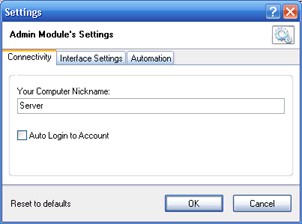
| Settings dialog box
|
|
|
| "Your PC's Nickname" - the nickname you assign to your computer.
|
|
|
| Choose the "Auto Login to Online Account" option if you don't wish to enter your Account login information every time you start the Admin Module.
|
|
|
| This tab contains the Admin Module tray icon settings.
|
|
|
|
|
|
|
| Here you can set:
|
|
|
| 1. | Automatic actions, which take place when the Admin Module start.
|
| 2. | Automatic actions, which take place when you connect to a remote PC:
|
| · | "Reconnect to remote PC after connection breakdown". Your PC will continually try to connect to the target PC until a connection is successfully established (for "IP-address Connection" mode only).
|
| · | "Open Remote Screen window after connection". This option will free you from the repetitive pushing of the "Full Control" button. The Remote Screen window will immediately appear right after the connection is established.
|
|
|


