

 access PC behind router
Online Account Connection service
Remote PC Control behind the routers and firewalls
Anyplace Control offers an easy way of controlling remote computers over the Internet. Compared to the competitive products Anyplace Control's main difference is the level of practical use. Many remote control products that are designed to provide remote control over Internet appear to be difficult to use because of numerous technical problems. Many of these problems are already solved by Anyplace Control with the help of our new service Account Connection:
Online Account connection provides
- Over the Internet access to computers that do not have external static IP address. You can easily connect to the computers with internal (192.168.x.x) or dynamic IP address without network configurations. You can connect using the Account name and a computer nickname instead of the IP address.
- Bypass Router and bypass Firewall. HTTP/HTTPS proxy support. You can easily connect to the computers, located behind the router or behind the firewall over the Internet without configuring of routers or Firewalls.
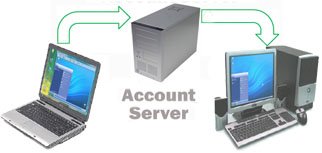 |
After a connection with the Gateway Server is successfully established you are able to connect the Admin computer to the Host computers.
|
This technology solves configuration issues related to IP addresses, routers and firewalls, and resembling a MS Messenger.
Execution of the service in Anyplace Control
In order to use the Account Connection service you would need to install Anyplace Control Host and Admin modules at least on 2 different computers.
All your computers will be grouped in the Online Account. Each computer in the Online Account has a unique nickname.
During the installation process of Anyplace Control you can create a new Online Account or connect to an existing one. To enter Online Account you would need to know the Online Account Name and a Password.
After you have added your Host computer into the Online Account it is very easy to connect to it over the Internet. You would first need to start the Admin module. In the Online Account Connection tab you can see the list of the Host computers of your Online Account. You can also see the online status of these computers. Your Online Account is almost identical to the Windows Network Places. It resembles a VPN (virtual private network). Next, select a computer from the list; click the Connect button and you are connected.
Security
The exchange of data through the Anyplace Control Gateway Server is absolutely safe and confidential.
Our system is built upon the industry-standard safe security algorithms. Banking institutions use similar algorithms to conduct money transfers over the Internet.
The safety of our system is achieved by the following technologies:
- Secure authentication and traffic encryption. All data transferred through our Gateway Server is encrypted. The program uses CHAP algorithm for the authentication and a RC4 algorithm with 128 bit random key for encryption.
- Double-password protection. In order to establish a connection to the remote computer over the Internet you have to set up at least 2 passwords. The first one is the Online Account Password, which you use to authenticate with the Online Account. After passing the first authentication, you will be able to see a list of the computers added into the Online Account. The second password will allow you to connect to the remote Host computer. In case an unauthorized person acquires your Online Account Password they will not be able to connect to the Host machine because it requires its own Access Password. We highly recommend that you keep your Access Password safe.
- Your data privacy. None of your users' private data including the Access Passwords is stored anywhere on our server.
- No open ports on the Firewall. You will not need to open ports on the firewall in order to use the Online Connection service. This type of remote access is not only more convenient but practically more secure because you don't need to create back doors in your security system.
- Dynamical IP addresses (remote controlling computer via internet).
Depending on the Internet provider, your computer can get a permanently changing Internet address. This type of addresses is called 'dynamic', and is typically provided by most Internet access providers. If you would like to connect to a remote computer, but you do not know its current IP address, it may become very challenging to establish proper remote control settings. - Private (Internal) IP addresses.
In many common situations, a remote computer you want to control is located in a corporate or home LAN, which is behind a router or proxy server. As a rule, the computers, which are located on a LAN have only internal IP addresses like 192.168.x.x. This address is valid on a LAN environment only, and not for over the Internet connection. In other words, you can not connect to a remote computer over the Internet using an internal IP address.
The Anyplace Control Online Account Connection service automatically solves problems with IP addresses because the connection between the PCs is provided using the Online Account name and a nickname.
- User issues with router configurations (remote assistance behind router).
The standard way of making a connection to a remote computer that has an internal IP address over the Internet requires a proper configuration of the router. In practice, only technical specialists manage to do it correctly. Your system Administrator is likely to refuse to setup the router for port forwarding because of the security risks this may cause. Online Account connection service allows access to a remote computer on a LAN over the Internet without any router setting or changes. - Problems with Firewalls (remote control behind firewall).
Firewalls are designed to protect your computers from viruses, malicious attacks and hacking. The contemporary IP-based remote control solutions require opening on the Firewall, which causes security risks. Anyplace Control Online Account Connection service does not require opening Firewall ports. We solve your security issues and you do not need to spend time on tricky firewall configurations. - Proxy-Servers support.
Additionally Anyplace Control supports connection via HTTP Proxy Server, that makes it a better choice than other solutions from the point of practical use.


