


Connection
Anyplace Control
| Table Of Contents Previous Next |
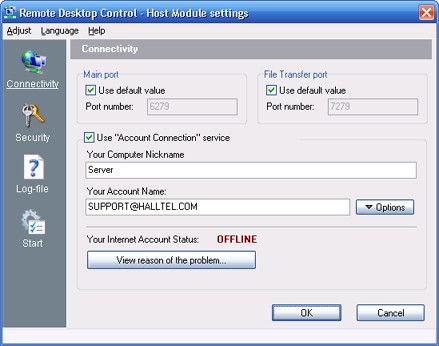
| Anyplace Control uses two ports to connect in IP-address Connection mode - the main port for traffic is 5279 and other one 4979 for file transfer. You may change default port value as follows: uncheck "Use default value" check box and enter the new port value.
|
Enable "Online Account Connection" service
| If you want to allow a remote access to your PC using Online Account Connection service, check a correspondent option. Otherwise, connection to Host Module could be established in other connection modes.
|
Your PC's Nickname
| Host computer nickname, entered in this field, will be displayed in the Admin's Address Book in the Online Account Connection mode.
|
"Option" button
| Click this button to call menu with the Online Account management commands.
|
|
|
| If Host Module is currently available to be accessed using the Online Account, its caption will be "ONLINE". Otherwise - the caption is "OFLINE". To reveal the reason of "Offline" caption press "View Reason" button.
|
|
|


