|
|
|||||||||||
|
||||||||||||
|
Host Module: Start settings
|
Top Previous Next |
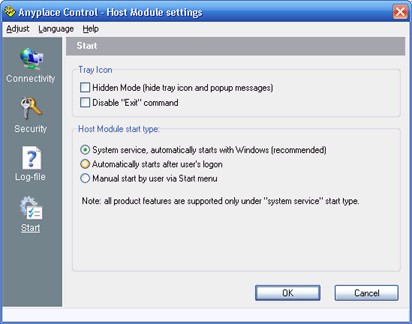
Fig.11. Host Module Settings: Start tab.
| Use "Disable Exit command" option to prevent closing of Host Module via tray icon menu.
|
| This feature guarantees that Administrator will have remote access to Host PC when it is required, because remote user can't close Host Module via tray icon.
|
|
|
| Note: Also you should protect access to Host Module's settings by Access Password, because user of Host PC can enable "Exit" command again; see the Security tab of "Host Module Settings" dialog.
|
|
|
|
|
| Use this option to hide Host Module's tray icon.
|
| You should have administrator's rights to change this option.
|
|
|
| Use options 2 for choosing how the Host Module will be running on your PC. There are such variants:
|
|
|
| · | As system service, which automatically starts with Windows;
|
| · | As simple application, which automatically starts after the user's logon;
|
| · | As simple application, which doesn't start automatically, but can be started manually.
|
|
|
| Note: Only in system service mode the Host Module supports all its features.
|
keywords: free pc remote control software download, and remote control windows. How to file transfer software or transfer beam file between computers via remote desktop control software and easy remote access? tightvnc. Remote control computer. Both remote assistance software and Remote Access Computer
![]() |
|
![]() |
||||||||||
|
Copyright © 2002-2008 Anyplace Control Software |
||||||||||||