


Host Module's tray icon
Anyplace Control
| Table Of Contents Previous Next |
| The Host Module places an icon in the system tray. When the Admin user connects, the Host Module icon lights up and a pop-up window appear notifying the remote user about the connection.
|
|
|
|
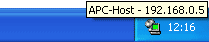
| Host Module's tray icon.
|
|
|
| To turn off the tray icon, use the "Hidden mode" option in the Host Module Settings (see "Start" tab).
|
|
|
| Tip: Move your mouse pointer over the Host Module tray icon and the tool tip will show you the list of computers that are connected.
|
|
|
| After clicking on the tray icon with a right click a a pop-up menu will appear. It contains the following commands:
|
|
|
| 1. Settings
|
| 2. Current Connections
|
| 3. About
|
| 4. Help
|
| 5. "Exit" command closes the Host Module.
|
|
|
| You may disable the Host Module "Exit" command by checking the correspondent check box in the Host Module settings (see "Start" tab).
|


