Anyplace Control - Working with Remote Screen
Remote Control Desktop, Remote Screen
| Table Of Contents |
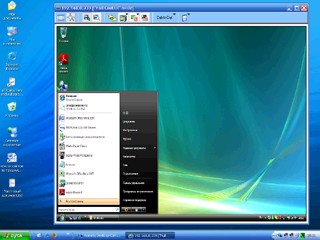
The Remote Screen window is the primary interface
for interacting with individual remote PCs. Each Host
PC has its own Remote Screen window. These windows
are used for displaying the screens of the remote computers
in real time. You can control the remote screen
by your keyboard and mouse in this window, but it is
possible only in the Control Mode. You will even be
able to transfer different data (text, graphics, etc.)
between computers using Clipboard Transfer feature.
Also there is a possibility of power management (shutting
down, logging off, etc.) of the remote computer through
the Remote Screen window.
You can have many Remote Screen windows open
simultaneously. You can tile these windows horizontally,
vertically and to cascade them through the "Window"
menu commands in Control Window.
You can specify whether the program will be always remembering
the position, size, display mode and color palette of
each Remote Screen window. This is being done
through the Settings dialog.