|
Operations with Account
|
Top Previous Next |
|
|
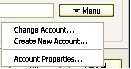
| Each module has similar instrument for managing your Account. Press "Menu" button in Admin (Host) module->Settings->Connectivity and you will see 3 operations available.
|
|
|
|
|
|
|
|
| 1) You can change Account Properties selecting "Account Properties" point. To access this parameter you need to know Account Password. In this dialog box you can view all Account properties. You can also change your Account Password and Account Access type here. Click Purchase button will lead you straight to the page where you can order a subscription. You can check your Payment History in the corresponding tab.
|
|
|
| 2) "Change account" point will switch you between existing Accounts (for example home and corporate).
|
|
|
| 3) "Create New Account" point enables you to create a new Account instead of existing one (you can't create more than one trial Account).
|